Page 3

with Super Blade Pro


Using the Magic Wand, Shift select the sections of the ornament that you want to have a jewelled effect. Open Super Blade Pro and apply the hot purple preset.

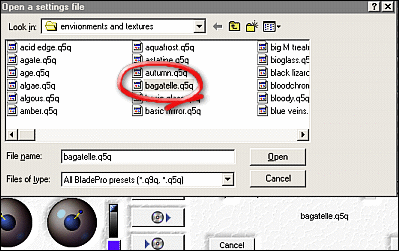
Again using the Magic Wand and Shift select, select the sections you would like to look enamelled.  Open Super Blade Pro again, and apply the bagatelle preset.


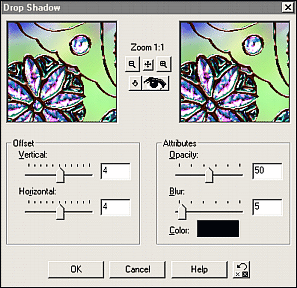
Shift Select the white areas of the background, (make sure you get the little sections in between the chain the ornament) then go to Selections/Invert.  Effects/3D/Drop Shadow with the settings shown.

That's it, you're done, now make a pretty e-card and send it to a loved one!


Home ] Up ]

Email Me!

All contents of this site are the property of Dizteq and Dizteq Net Design. © 2000 Dizteq. Unless specifically made available for download, no graphics or text may be removed from this site for any reason without express written permission from Dizteq.