|
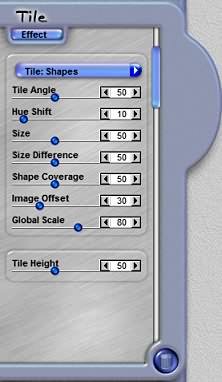
Size Difference
This slider control defines how much variety in difference there is between the smallest and the largest tiles
that are generated. The Size Difference control lets you establish how much of a difference there is between
the smallest and largest size tile.
Shape Coverage
This slider control sets how many tile shapes are stacked on top of each other to cover the image area. The
higher the setting, the more tiles get generated and stacked on top of each other to form the image.
Image Offset
This slider control allows you to offset the image inside all the tiles globally. The higher the setting on
this control, the more the image is offset. You can manually shift an image's position by using the Transform
Photo tool.
Global Scale
This slider control defines the size of the effect as it is applied to the image. Use this control to scale
the size of the effect on a constrained basis.
Tile Height
This slider control defines the shading for the tiles and how high they appear to be off of the background
and in relation to other tiles.
|