
|
|
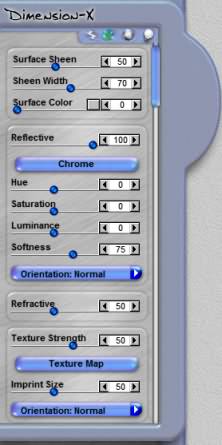
Surface ControlsThe Surface Controls allow you to apply different surface attributes to your effects. It allows you to adjust the visible textures on the surface of an effect as well as change the content that some effects use to generate reflections. The image below shows the Surface Control as the second button from the left side. Please note that the image below might be slightly different in different effects. |
|
 Effect - Surface - Environment - Lighting |
|
|
Surface Sheen |
|
|
Sheen Width Surface Color Reflective |
|
Reflection Map Hue Saturation Luminance Softness Surface Map Orientation |
|
  
|
|
|
By Joe Cilinceon, © July 24, 2002 |
|