|
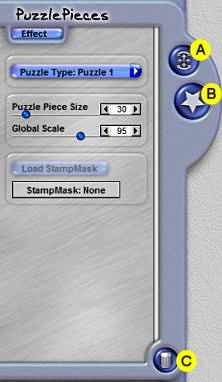
Puzzle Piece Size
This slider control defines how large the puzzle pieces are on the photo. The larger the pieces, the fewer
of them are used to create the effect.
Global Scale
This slider control defines the size of the effect as it is applied to the image. Use this control to scale
the size of the effect on a constrained basis.
Load Stamp Mask
This button is active once you use the Clone Stamp Mask tool to place a Stamp Mask effect on the layout.
Click the button to access the installed library of Stamp Masks, or select a Stamp Mask of your own. You may
load a different Stamp Mask into each Stamp Mask you place on the layout using the Clone Stamp Mask tool.
Use the Transform Stamp Mask tool to first select the Stamp Mask and then use the Load Stamp Mask button to
apply the desired Stamp Mask into the selected object.
Selected Stamp Mask
This slider control shades the edges and curls the edges of the strips to give them additional depth.
|