DS
 

Liquid Metal page 2.


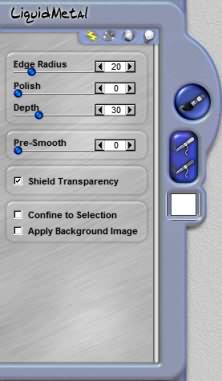
Edge Radius
This slider adjusts the angle and sharpness of the bevel edge. Use this control with Polish Curvature and Bevel Depth sliders to refine the look of the depth.

Polish Curvature
This slider rounds and smooths the angles of the bevel making them softer with gentle curves versus sharp angles. Use this control with Edge Radius and Bevel Depth slider to refine the look of depth.

 
Liquid Metal Control

Depth
This slider determines the height of the bevel. Increasing the value of this makes the bevel appear to have more height and depth. Use this control with the Edge Radius and Polish Curvature sliders to refine the look of depth.

Pre-Smooth
This slider mask smooths the edges of the selection mask. The quality of the selection mask you are using can impact the results you achieve from the effect.

Shield Transparency
When checked the effect will only apply to the pixels on a layer and not the transparent areas. This changes how Dreamsuite applies the effect around the image.

Confine to Selection
When checked the effect will only apply to the selected areas. This option is only available if you have a selection.

Apply Background Image
When this is checked the background image behind the selection will show up in the preview and will also apply as part of the effect.

 
Back to Page 1HomeTutorials
 

By Joe Cilinceon, © July 26, 2002