
|
|
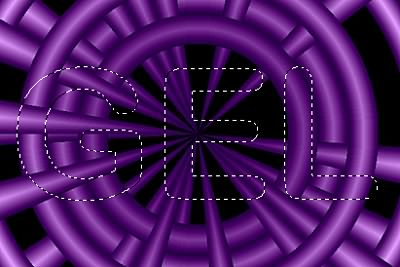
Gel TipsThere are many different ways to apply Gel to your images. If you desire to have your Gels overlap with each other and interact, or if you desire to have gel overlap a background image, use the following instructions. How to SetupFirst make sure your background image is on a layer. Now you will want a selection of the object you wish to Gel. The image below is an example were we put the word GEL (Arial Round Bold) over some pipe images. |
|
 |
|
|
At this point, I picked the Gel effect from the DreamSuite Special Effects. I used no presets and just used the defaults. Now keep in mind that we are looking for the word GEL to be translucent over the pipe image. The first step is to set our Edge Radius and Depth to get a nice smooth round look. Once these are set to our satisfaction, we need to start working on the translucence of the effect. To do this, we'll need to balance the Gel Color and Refractive settings. It's usually best to first lower the gel color and then fine tune the refractive next. What we have now is the word GEL looking like a fluid filled image that is transparent but distorts the underlying pipes slightly. The example below will show you what this effect looks like so far. |
|
 |
|
|
If you wanted to add more effects to this, you would need to save at this point and repeat the steps above with a new selection. |
|
  
|
|
|
By Joe Cilinceon, © August 4, 2002 |