DS
 

Focus page 2


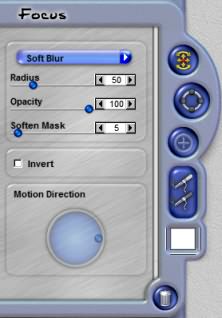
Focus Type
This menu allows you to pick from different types of Focus effects. You can pick from Soft, Zoom, Rotation, Directional and Speckle.

 
Focus Controls

Radius Strength
This slider controls the strength of the Focus effect. The higher the settings the stronger the out of focus appearance across the Ellipse

Opacity
Adjusting the opacity of the Focus lessens the effect overall.

Soften Mask
This slider allows the focus effect to blend from the background into the masked foreground image around the edges.

Invert
When checked the focus effect is reversed inside the Ellipse going our of focus in the center to in focus at the outside of the Ellipse.

Motion Direction
When the Focus Type is Directional Blur the Motion Direction control defines the direction of the blur.

 
Back to Page 1HomeTutorials
 

By Joe Cilinceon, © July 25, 2002