DS
 

Dreamy Photo is one of the free filters you can get from AutoFX. It can give images a soft-toned feel or a dreamy look in seconds. Dreamy Photo will work with or without selection masks. I think of this filter as a super-blur filter.

 
Dreamy Photo Example
 

Ghost Type
Use this to select the different kinds of blur methods for ghosting.

Edge Radius
This slider controls how sharply the chisel angle appears with in the selection.

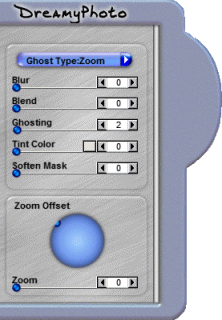
Dreamy Photo Control

Blur
This control will soften the ghosting pattern that is applied.

Blend
This control transitions the ghosted values of the image giving a stronger dreamy look. The higher the settings the stronger the blend.

Ghosting
This control gives the base image a higher contrasted look.

Tint Color
You can tint the tonal values of the your image, to give a hint of overall color where the lighter values are.

Soften Mask
This allows you to soften the selected areas of a photo or mask if you have loaded one using the Edit > Load Mask function.

Zoom Offset Direction
Adjust this to control the direction the ghosted image is offset from itself. Use this function in conjunction with the Zoom Slider.

Zoom Slider
This control defines how much the Zoomed image is.

 
TutorialsHome
 

By Joe Cilinceon, © July 23, 2002