
|
|
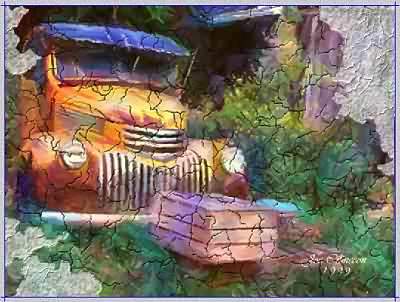
Crackle TipsUsing the Flake Crack ToolYou can select this tool, then draw irregular shapes, making sure to end the at the same point where you began. This will automatically shape itself to the rough dimensions you have drawn. This tool is designed to spread and contract automatically so the flake will not be a perfect shape to match your drawing. You can use the Flake Crack tool to add areas back in, by redrawing, and holding down the ALT key. Look at the Flake Cracks in the example below. |
|
 |
|
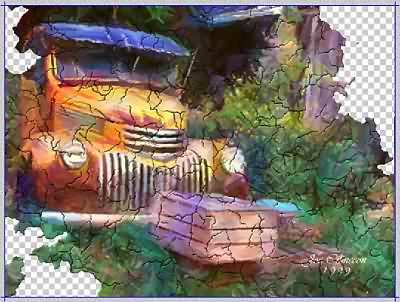
Crackle TipsOther AdjustmentsAs with many of DreamSuite's effects, lighting plays an important part in how the cracks are seen. As light strikes the cracks, the edges of the cracks are highlighted, or are cast in shadows, depending on the angle, position, and strength of the Light Points on the Light Sphere. It is helpful to use the Opacity control to adjust the overall strength of the cracks and how they appear on our image. I find that settings between 30 - 50% range are best, as this prevents the cracks from being too strong overall. Another tool that can be very useful is the Flake Shows Imprint checkbox. With this box unchecked, the flaked areas will show as transparent. This can be useful when you want the image over other layers. See the example below for this effect when unchecked. |
|
 |
|
  
|
|
|
By Joe Cilinceon, © August 4, 2002 |